Leading companies like CarMax have implemented AutoTrace to track hundreds of thousands of mobile assets, like vehicles and car keys, reducing costs and driving new revenue.
Thank You!
We’ve successfully received your information and we’ll get in touch with you soon :)
Oops! Something went wrong while submitting the form.
Leading companies like Jiffy Lube, Grease Monkey, and Discount Tire have implemented PitCrew in their service centers to achieve maximum performance and throughput.
Thank You!
We’ve successfully received your information and we’ll get in touch with you soon :)
Oops! Something went wrong while submitting the form.
Download The PitCrew Guide
Leading companies like Jiffy Lube, Grease Monkey, and Discount Tire have implemented PitCrew in their service centers to achieve maximum performance and throughput.
Leading companies like Schnucks Markets have implemented ExpressLane wherever they have lines of people or vehicles, delighting customers with shorter wait times and faster service.
Thank You!
We’ve successfully received your information and we’ll get in touch with you soon :)
Oops! Something went wrong while submitting the form.
Download The ExpressLane Guide
Leading companies like Schnucks Markets have implemented ExpressLane wherever they have lines of people or vehicles, delighting customers with shorter wait times and faster service.
Spot the Drive-Offs: PitCrew Tracks Every Car in Your Backlot
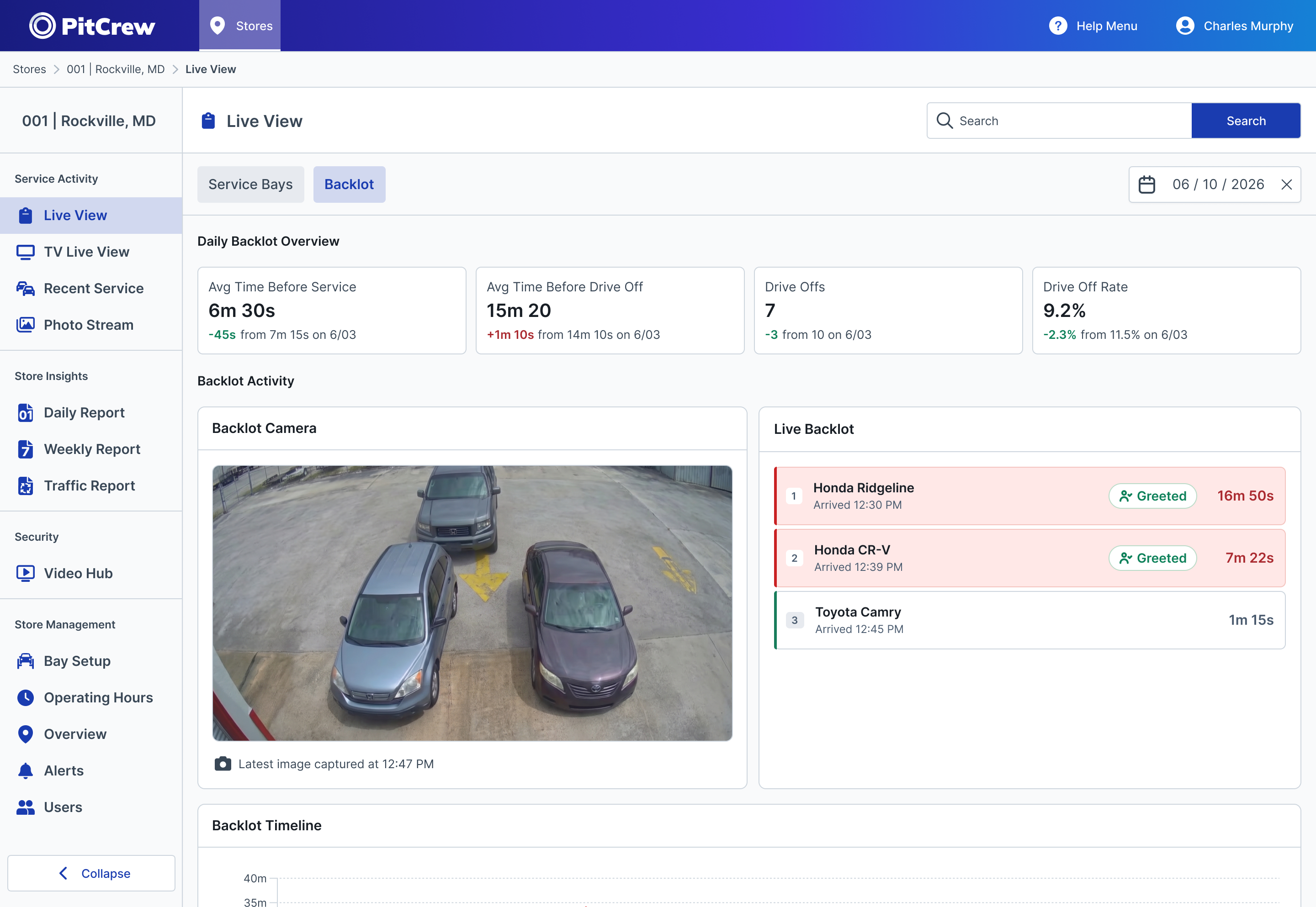
PitCrew shows every car waiting in your backlot, flags drive-offs as they happen, and records whether each car got greeted.
October 23, 2026
At quick lube and oil change service centers, the visit starts before a car reaches the bay. The wait in the backlot is the customer's first impression, and when it runs long, some customers drive off. That's a lost ticket today, possibly a lost customer for good.
Most service centers can't see the scale of the problem at all. How long did each car wait? Did anyone walk out to say hello? PitCrew answers those questions with the cameras already watching the lot.
PitCrew tracks the backlot by following each vehicle from the moment it enters the lot and recording where it ends up. If its last stop is a bay, it's a service. If its last stop is the exit, it's a drive-off — a vehicle that left before being serviced. PitCrew ignores objects that never move, like cones and signs, so the counts reflect real cars rather than clutter in the frame.
All of it runs on the cameras you already have. There's no new hardware to install.
Every Car in the Lot, Accounted For
PitCrew gives the backlot its own view, with what a manager needs in one place:
Backlot metrics. Average time before service, average time before a drive-off, total drive-offs, and drive-off rate — each compared against last week, alongside the bay metrics PitCrew already tracks.
Cars in the lot. Every car in the order it arrived and how long it’s been waiting. Cars that pass your target wait time are flagged, so the team sees who’s waited too long before the customer has to say so.
Backlot camera. The latest photo from the lot, plus links into the photo and video stream for any car.
The day at a glance. How backlot time rose and fell against your target, when each drive-off happened, and how many cars were serviced versus lost each hour.
Every Drive-Off Gets a Name and a Reason
Every drive-off is listed by vehicle, and the team can tag it with a reason. A missing part, a service the location doesn't offer, a delivery driver cutting through the lot who was never a customer at all — each gets its own tag. Over time, those tags separate the drive-offs caused by the wait from the ones that have nothing to do with the line.
PitCrew Shows Whether Each Car Was Greeted
A prompt greeting is one of the things customers notice most at a quick lube. In a J.D. Power study reported by National Oil & Lube News, quick lube customers reported a prompt greeting more often than other aftermarket service customers — and still only 53% of the time.
PitCrew records whether each car gets greeted. PitCrew marks each car once a team member has walked up to it, and every service and drive-off keeps that greet record. A manager can check whether the cars that drove off were the ones nobody greeted, then bring that to the next shift huddle.
Managers Can Act While the Customer Is Still in the Lot
Backlot problems used to surface as a feeling at the end of a long Saturday. With the backlot on screen, a manager can send someone out to greet the car that just pulled in, move the longest-waiting car into the next open bay, and walk into Monday's meeting knowing how many customers left and why.
Eric is a seasoned writer and editor with over a decade of experience covering consumer technology for publications such as Gizmodo, Popular Mechanics, Gear Patrol, and DPReview. Beyond writing about tech, he enjoys hands-on projects like automating his home, experimenting with electronics, composing music, and occasionally contributing to open-source video games.




.svg)

